Manage your profile
Updated October 31, 2026 · Applies to Platform ONE 1.34
My profile holds your account details, your access, your password, and, where your organization has set them up, your calendar and email.
Prerequisites
- A Platform ONE staff account.
Open your profile
-
Select your initials in the top-right corner, and then select My profile.
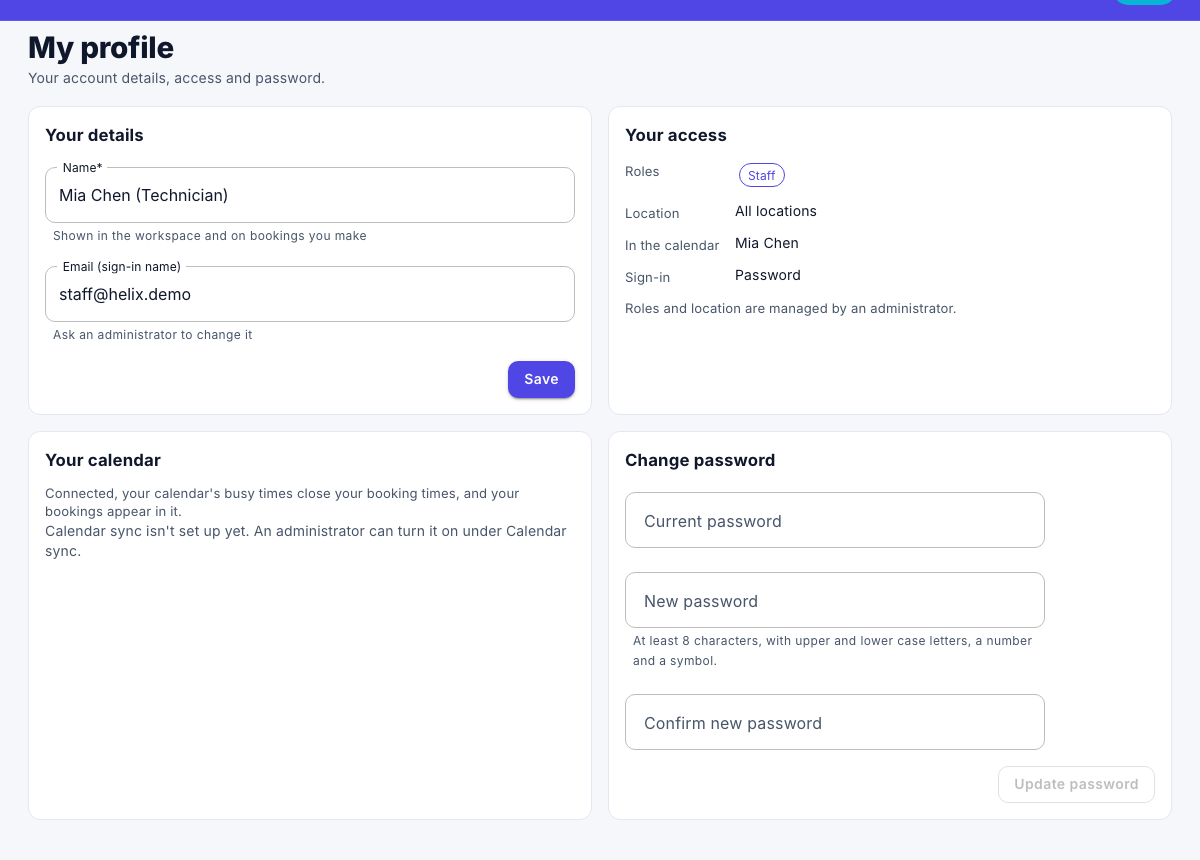
Change your name
- Under Your details, change your Name. It's shown in the workspace and on what you make.
- Select Save.
Your Email (sign-in name) can be changed only by an administrator.
See your access
Your access shows your Roles, your Location and how you Sign-in. Roles and location are managed by an administrator. See Roles and access.
Change your password
- Under Change password, enter your Current password.
- Enter a New password, and enter it again in Confirm new password. It needs at least 8 characters, with upper and lower case letters, a number and a symbol.
- Select Update password.
If you sign in with your organization's account, the section is called Set a password: you can add a password to sign in with as well.
Connect your calendar and email
Where your administrator has turned them on, Your calendar and Email sync let you connect your Microsoft 365 or Google account. See Connect your calendar and Log and send email from a record.