Customize branding
Updated October 31, 2026 · Applies to Platform ONE 1.34
Branding sets how your workspace looks to your staff and to your customers: the name and initials in the top bar, and the colors of buttons and links. It also applies to the emails the app sends.
Prerequisites
- The Admin role.
Change your branding
-
In the menu, under Administration, select Branding.
-
Under Brand, enter the following information:
Field Description Organization name Required. Shown in the top bar and in emails. Tagline A short line shown under the name, for example on your public pages. Logo initials Up to three characters, shown in the logo square. Primary color The main color of the top bar and buttons. Accent color The second color, used for highlights. -
Check the contrast message under the colors. Choose a darker primary color if it says the contrast is below WCAG AA 4.5:1, so white text stays readable.
-
Check the Live preview, and then select Save changes.
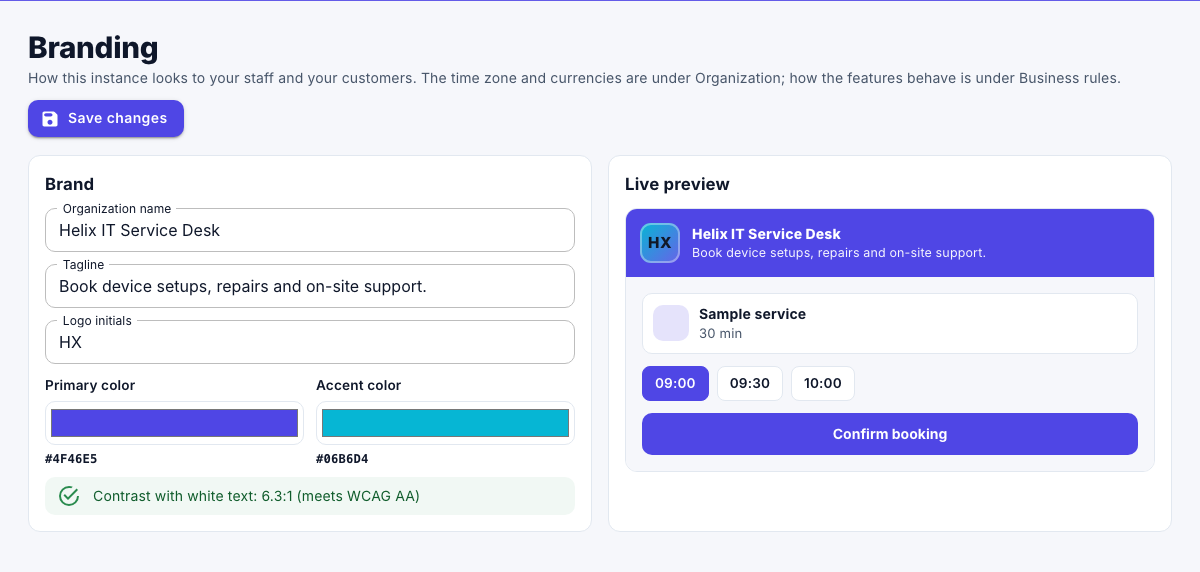
The page reloads with the new look.
Note
Platform ONE shows your initials in a colored square. You can't upload a logo image.