Manage customers
Updated October 31, 2026 · Applies to BookIt ONE 1.34
Customers need an account to book online. You choose how they get one, and manage their profiles. Your organization may use its own word: for example, in a medical office, customers might be called Patients.
Prerequisites
- The Admin role.
Choose how customers get an account
-
In the menu, under Administration, select Sign-in & SSO.
-
Under Customer accounts, set the following:
Field Description Customers can create their own account Turn off to create accounts only from the front desk. Require email confirmation before first sign-in Customers confirm their address with a link. Sign-up email domains Only these domains can sign up, for example a university's. Empty means anyone. -
Select Save.
To let customers sign in with their organization's account, add an identity provider with the default role Customer. See Set up sign-in and single sign-on.
Review customers
-
Under Administration, select Customers.
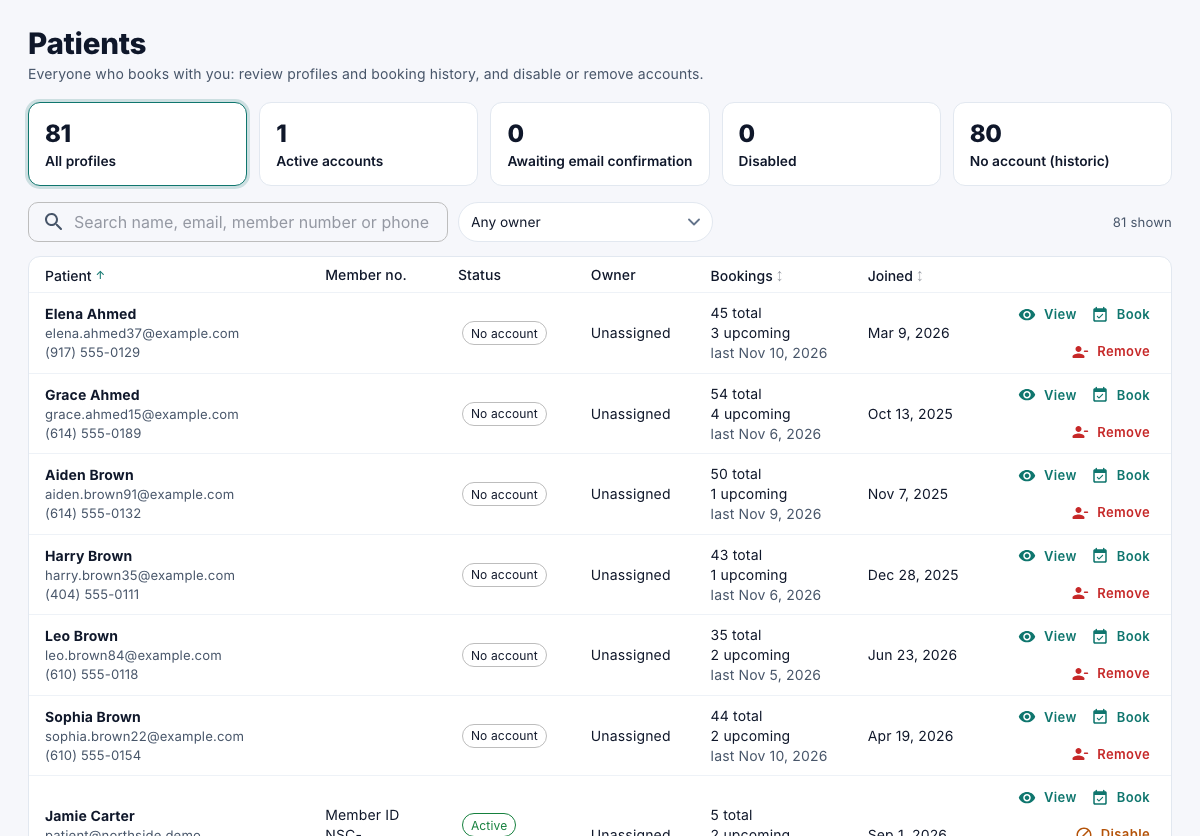
| Button | What it does |
|---|---|
| View | Their details and booking history. |
| Book | Books for them. See Book an appointment for a caller. |
| Verify | Marks their email as confirmed. |
| Disable / Enable | A disabled customer can't sign in or book. Their profile and bookings are kept. |
| Remove | Deletes the account and personal details. Upcoming bookings are canceled, and the customer is emailed. Past bookings stay in your statistics without personal data. |