Connect other systems with API keys and webhooks
Updated October 31, 2026 · Applies to Platform ONE 1.34
Connect Platform ONE to your other systems:
- API keys let another system, or an AI agent, read and change your records through the Platform ONE API.
- Webhooks call an address of yours when something happens, for example when a booking is canceled or a deal moves to another stage.
You manage both on the API & webhooks page. Select Documentation at the top of the page for the full API documentation, which lists only the products your organization has.
Prerequisites
- The Admin role.
- The Professional edition. See Plans and features.
Create an API key
-
In the menu, under Administration, select API & webhooks.
-
Under API keys, enter the following information:
Field Description Name (the system that will use it) For example "Website" or "Payroll". Access Read only, Read and write, or Read and write, with approval. With approval, the key's cancellations, refusals, approvals, removals and decisions on leads wait for a person under API approvals; everything else goes through at once. Expires (optional) The date the key stops working. Whose records Everyone's, one team's, or one person's. Products All products, or only some of them. What it may do Everything its products have, or only the kinds of record and actions you tick: Read, Create, Change, Cancel or remove. -
Select Create key.
-
Copy the key and store it somewhere safe, such as your organization's password manager, and then select I have copied it.
Important
The key is shown only once. Without limits, a key sees every record of its products, like an administrator. Give each system its own key, with only the access it needs.
The other system sends the key with each request in an Authorization: Bearer <key> header.
Everything a key changes is recorded in the audit log under its name.
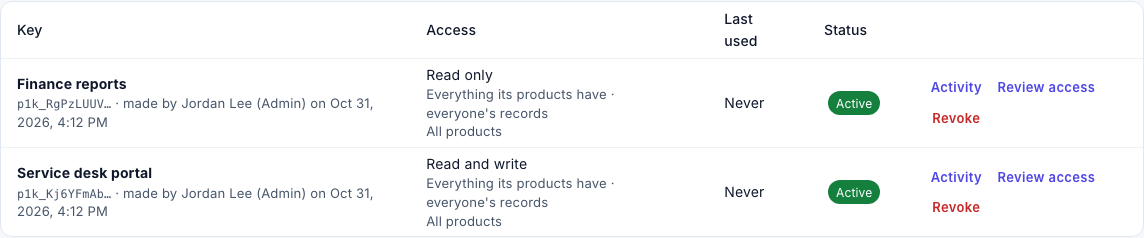
The list shows each key's status: Active, Needs review, Expired or Revoked. A key that Needs review is refused until an administrator selects Review access, checks it and selects Save and approve.
See what a key did
Select Activity on a key to see the last 30 days: its calls, writes, errors and calls over the rate limit, per day, its most frequent errors, its latest calls, and its changes that wait for approval.
Revoke an API key
- On the key's row, select Revoke, and then confirm.
The system that uses the key is refused from then on. This can't be undone; create a new key if it's needed again.
Approve changes that wait for a person
Changes from a key with approval wait under API approvals, in the menu under Administration. Administrators and managers can decide them.
- Under API approvals, open the change. Select What it would give to see the result.
- Select Approve, or enter a Reason and select Reject. The system that asked is told.
A change that nobody decides lapses after 48 hours.
Add a webhook
- Under Webhooks, enter a Name and the Address, which must start with
https://. Addresses inside a private network are refused. - Under Events, keep All events, or clear it and choose the events to send.
- Select Add webhook.
- Copy the signing secret, and then select I have copied it. The receiving side uses it to
check the
X-PlatformONE-Signatureheader of each call.
Each call carries the event and the record. A call that isn't answered with success within 10 seconds is tried again, several times over about a day. If nothing gets through for a day, the webhook is paused and administrators are told.
Manage a webhook
| Button | What it does |
|---|---|
| Send test | Sends a test event. |
| Deliveries | Lists the calls of the last 30 days and their result. Select Send again to repeat one. To catch up after the receiving side was down, choose a moment under Catch up: send what it missed since, and then select Send missed events. |
| Switch off / Switch on | Stops or restarts the calls. Events that happen while it's off aren't sent. |
| Change | Changes the name, address or events. |
| New secret | Replaces the signing secret at once. Give the new one to the receiving side. |
| Remove | Stops the calls and removes the delivery log. |