Manage companies
Updated October 31, 2026 · Applies to Rolodex ONE 1.34
Companies are the organizations your contacts belong to. Everyone sees the companies; the people in them follow the contact rules.
Prerequisites
- The Admin, Manager, Reception or Staff role.
Find a company
- In the menu, under Workspace, select Companies.
- Search by company, address or tag, or sort by a column.
Add a company
-
In the menu, under Workspace, select Companies.
-
Select Add company.
-
Enter its Name, which must be different from every other company's, and optionally its Website, Phone, Address and Tags (comma-separated).
-
Select Save.
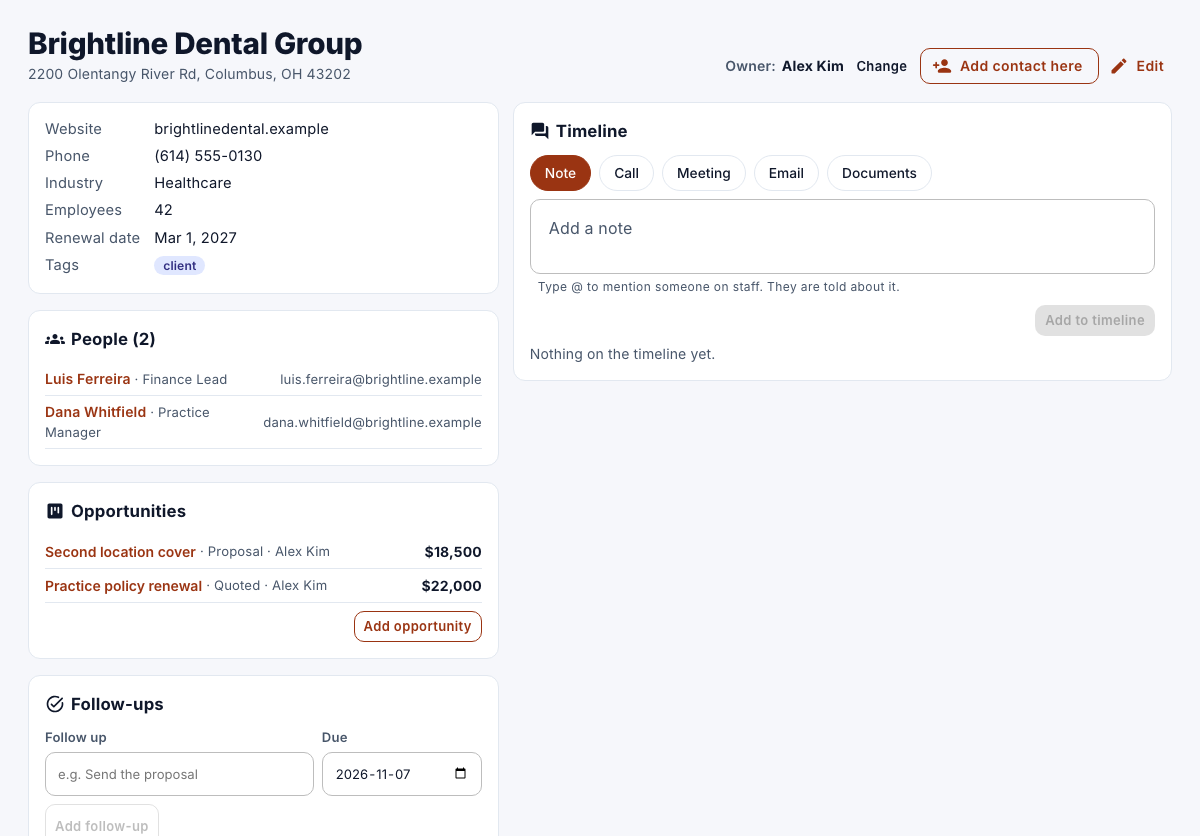
Work with a company
Open a company to see its details, the people you can see there under People, its follow-ups and its timeline. To add someone, select Add contact here. To change the details, select Edit.
Remove a company
- Open the company, select Remove, and then confirm.
The company, its timeline and follow-ups are deleted. Its people stay as contacts without a company. Only managers and administrators can remove a company.