Set up email sync
Updated October 31, 2026 · Applies to Platform ONE 1.34
Email sync shows the emails your staff exchange with your contacts on the contact's record. Staff can also write to a contact from the record; the email leaves through their own mailbox and stays in their sent items.
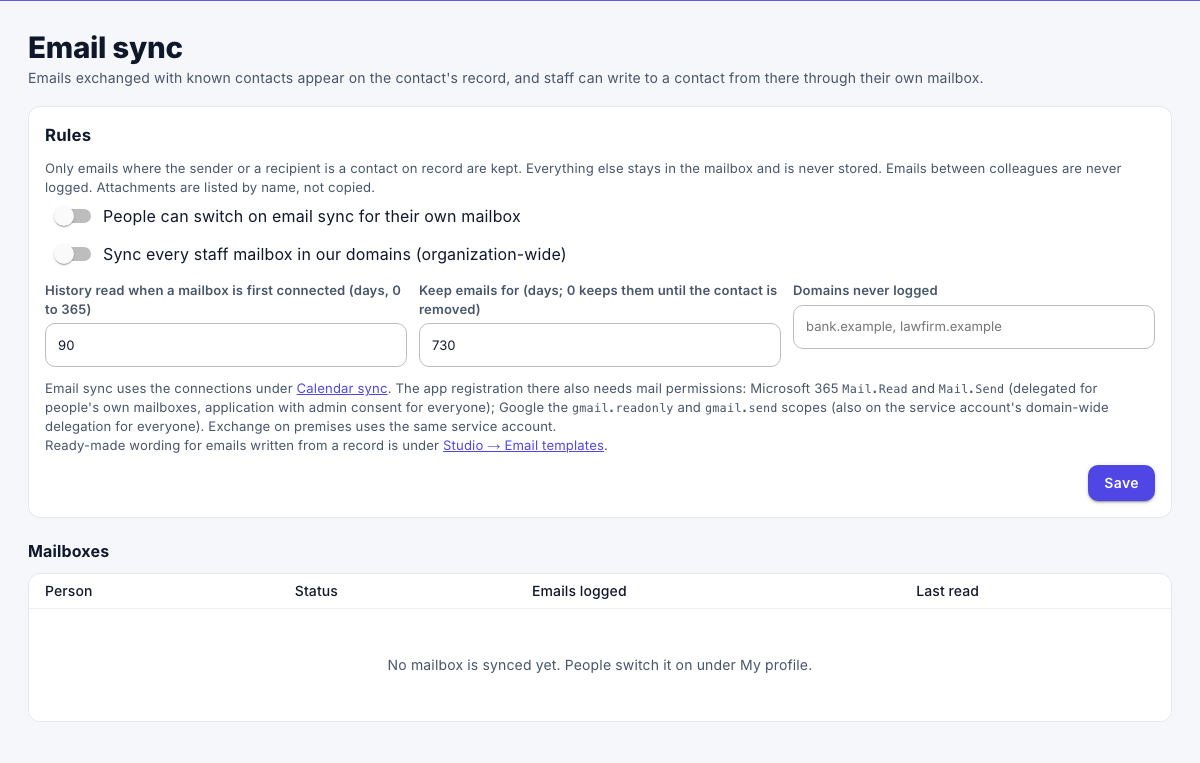
Only emails where the sender or a recipient is a contact on record are kept. Everything else stays in the mailbox and is never stored. Emails between colleagues are never logged. Attachments are listed by name, not copied.
Prerequisites
-
The Admin role.
-
Email sync needs the Professional edition. Email sync for the whole organization, and with Exchange on premises, needs Enterprise. See Plans and features.
-
A provider set up under Calendar sync, with mail permissions added:
Provider People's own mailboxes Organization-wide Microsoft 365 Delegated Mail.ReadandMail.SendApplication Mail.ReadandMail.Send, with admin consentGoogle The gmail.readonlyandgmail.sendscopes on the OAuth clientBoth scopes on the service account's domain-wide delegation Exchange on premises Not available The same service account as for calendar sync
Turn on email sync
-
In the menu, under Administration, select Email sync.
-
Under Rules, set the following:
Field Description People can switch on email sync for their own mailbox Each person then turns it on under Email sync on My profile. Sync every staff mailbox in our domains (organization-wide) Every staff mailbox in the domains set under Calendar sync. History read when a mailbox is first connected 0 to 365 days. Keep emails for In days. 0 keeps them until the contact is removed. Domains never logged Emails with these domains are never kept, for example your bank or your lawyers. -
Select Save.
Mailboxes are read every few minutes. Emails older than the retention period are removed every night.
See the mailboxes
Under Mailboxes, the page lists each synced mailbox, with its status, how many emails were logged and when it was last read.
Who sees the emails
An email follows the contact or customer it was logged on: people who can see that record can see it. People can remove one email from a record, or stop logging their emails with a contact.
Ready-made wording for emails written from a record is under Studio email templates.