Work with shifts
Updated October 31, 2026 · Applies to Reserve ONE 1.34
Shifts shows each shift type by day for a week: who's on it, and where cover is missing.
Prerequisites
- The Professional edition of Reserve ONE. See Plans and features.
- To add or take people off a shift: the Manager or Admin role.
See the shifts
-
In the menu, under Workspace, select Shifts.
-
Choose the week, and optionally a Team and the location.
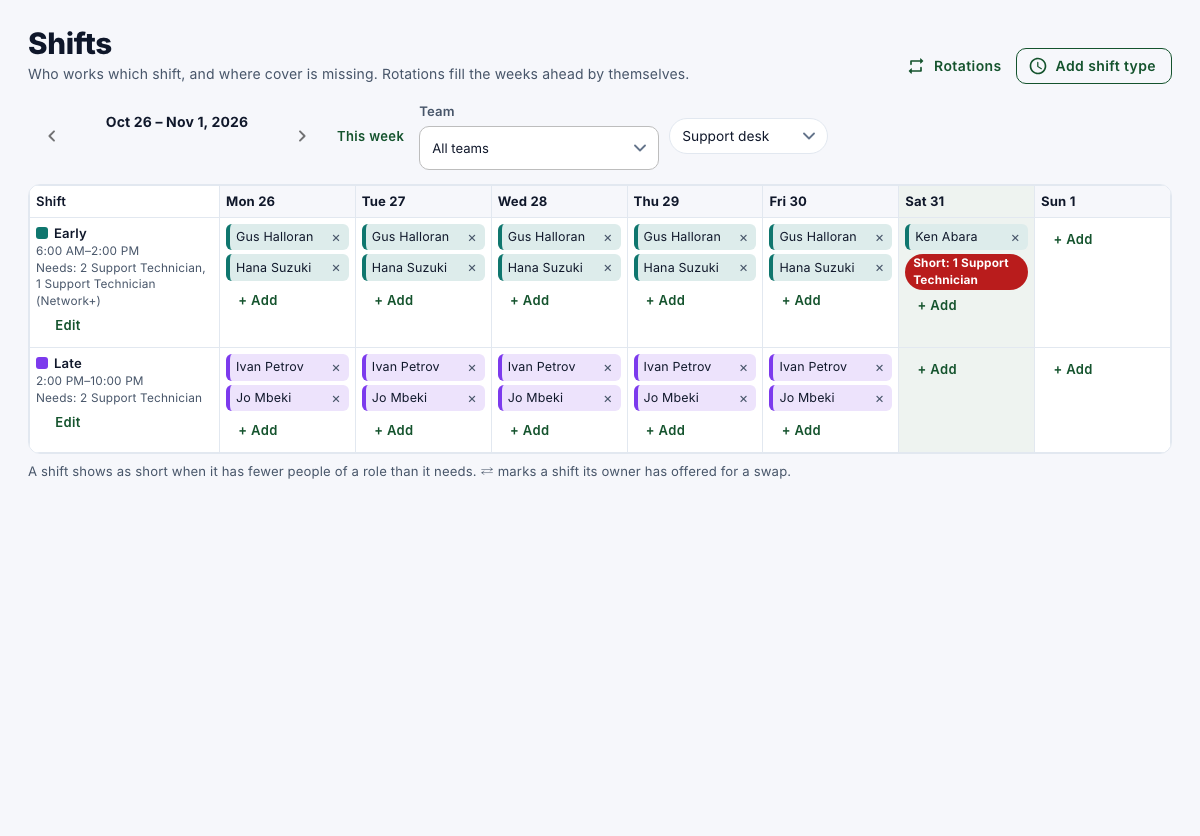
Each shift type shows what it Needs. A shift shows Short when it has fewer people of a role than it needs. ⇄ marks a shift its owner has offered for a swap.
Add someone to a shift
- On the day, select + Add on the shift.
- Choose Who, and then select Add to shift.
Someone on approved time off can't be added. If they're on other work at that time, it waits for their manager, unless you manage them.
Take someone off a shift
- Select × next to the person on the shift.
It happens at once, without a confirmation.
Shift types and rotations are set up by managers and administrators. See Set up shift types and rotations.