Request and change time off
Updated October 31, 2026 · Applies to PTO ONE 1.34
You request time off on the Time off page. Depending on its type, it waits for your manager's approval or takes effect at once.
Prerequisites
- An account linked to a person in your organization.
Request time off
-
In the menu, under Workspace, select Time off, and then select Request time off.
-
Enter the following information:
Field Description Type of time off For example vacation or sick leave. Your organization sets the types. Whole days or Part of a day Choose one. First day and Last day For whole days. Time off can be at most one year long. Day, From and To For part of a day. Select Morning or Afternoon to fill in half of your working day. Note for your manager (optional) Up to 500 characters. Type @to mention a colleague, who's then notified. -
Check the summary: how many business days or hours it uses, and, for types with an allowance, what you'll have left, including what's still waiting for approval.
-
Select Send request. For a type that needs no approval, the button is Save time off.
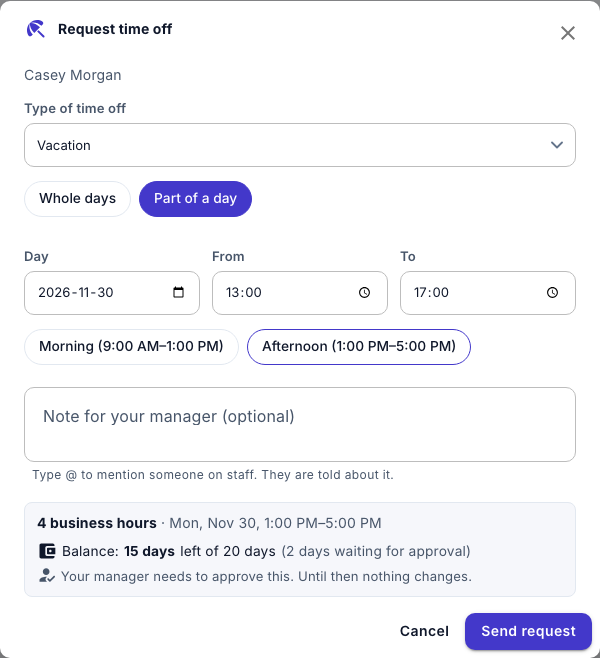
The dialog says what happens next:
- Your manager needs to approve this. The request waits, marked Awaiting approval, and your manager is notified.
- Takes effect straight away. The time off is approved at once, and your manager is told.
A request over your balance is allowed; your manager decides.
Note
You can't request time off in the past, or time off that overlaps time off you already have. Ask your manager to record time off that has already happened.
See your time off
Under My time off, you see this year's time off with its status, and, for each type with an allowance, how many days you have left. Below it, Approved in shows your totals for the year.
Change time off
- Under My time off, select the time off, and then select Change.
- Make your changes, and then select Save changes.
If your time off was already approved and you make it longer or move it, it goes back to your manager as a request, unless its type needs no approval. Making it shorter keeps it approved.
Withdraw a request or cancel time off
- Under My time off, select the time off.
- Select Withdraw request for a request that's still waiting, or Cancel time off for approved time off, and then confirm.