Docs › Platform ONE › Reserve ONE › User guide › See your schedule

See your schedule

Updated October 31, 2026 · Applies to Reserve ONE 1.34

My schedule shows what you're planned on over the next four weeks.

Prerequisites#

  • An account linked to you as a staff member on Staff & resources.

See your schedule#

  1. In the menu, under Workspace, select My schedule.
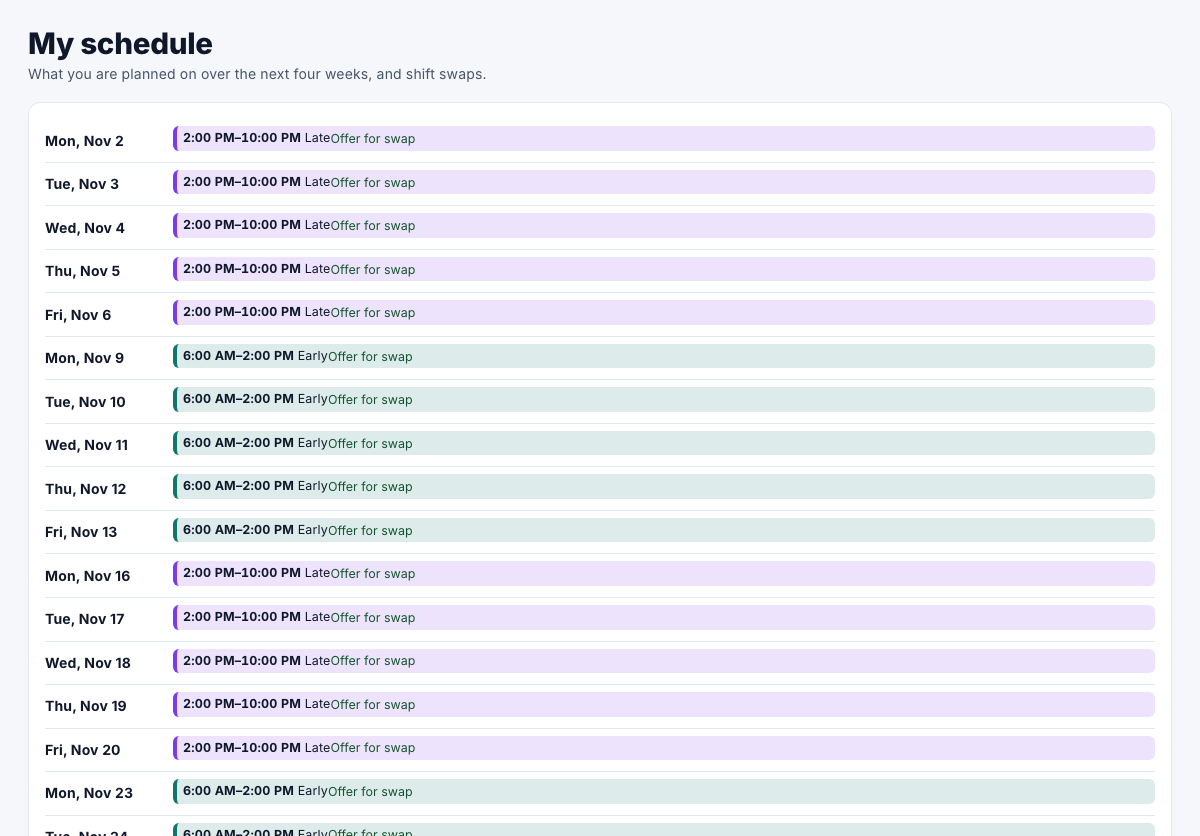
    My schedule, with the weeks ahead and shift swaps

Each day lists your projects and shifts. For swapping shifts, see Swap shifts.

Next steps#

  • Swap shifts
Previous: Quickstart: Plan someone on a project · Next: Use the planner
  • Platform ONE documentation
  • User guide
    • Overview
    • Quickstart: Get started
    • Get started
      • Sign in
      • Find your way around
      • Manage your profile
      • Use notifications
    • Concepts
      • Roles and access
      • Record ownership
    • Work with records
      • Change a record's owner
      • View a record's history
      • Connect your calendar
      • Log and send email from a record
    • Reference
      • FAQ
    • Troubleshoot
  • Administrator guide
    • Overview
    • Quickstart: Set up your organization
    • Configure
      • Time zone and currencies
      • Customize branding
      • Manage locations
      • Manage people
      • Manage teams
      • Manage holidays
      • Manage users and roles
      • Set up sign-in and single sign-on
      • Set business rules
      • Set up calendar sync
      • Set up email sync
      • API keys and webhooks
    • Studio
      • How Studio works
      • Add your own fields
      • Change the wording of messages
      • Write email templates
      • Automate work with workflows
      • Review and publish changes
    • Manage
      • Move record ownership
      • Review the audit log
      • Manage your subscription
      • Add and remove demo data
      • Check background jobs
    • Reference
      • Permissions
      • Plans and features
    • Troubleshoot
    • Release notes
  • PTO ONE
    • PTO ONE documentation
    • User guide
      • Overview
      • Quickstart: Request your first time off
      • Time off
        • Request and change time off
        • Approve time off
        • Use the team calendar
        • View leave balances
      • Reference
        • Statuses and rules
      • Troubleshoot
    • Administrator guide
      • Overview
      • Quickstart: Set up time off
      • Configure
        • Set up time off types
        • Manage leave balances
        • Export time off and balances
      • Troubleshoot
  • Rolodex ONE
    • Rolodex ONE documentation
    • User guide
      • Overview
      • Quickstart: Add your first contact
      • Contacts and companies
        • Manage contacts
        • Manage companies
        • Use the timeline
        • Manage follow-ups
      • Sales
        • Work with leads
        • Manage opportunities
        • Use the pipeline
      • Reference
        • Who sees what
      • Troubleshoot
    • Administrator guide
      • Overview
      • Quickstart: Set up Rolodex ONE
      • Configure
        • Set up sales pipelines
        • Set up leads
        • Add contact fields
      • Troubleshoot
  • BookIt ONE
    • BookIt ONE documentation
    • User guide
      • Overview
      • Quickstart: Book for a caller
      • Appointments
        • Use the Today page
        • Use the calendar
        • Book for a caller
        • Manage appointments
        • View reports
      • For customers
        • Book online
        • Manage your appointments
      • Reference
        • Appointment statuses
      • Troubleshoot
    • Administrator guide
      • Overview
      • Quickstart: Set up BookIt ONE
      • Configure
        • Set up services
        • Set up staff and resources
        • Set booking rules
        • Manage customers
        • Design the booking form
      • Troubleshoot
  • Reserve ONE
    • Reserve ONE documentation
    • User guide
      • Overview
      • Quickstart: Plan someone on a project
      • Planning
        • See your schedule
        • Use the planner
        • Manage projects
        • View capacity
      • Shifts
        • Work with shifts
        • Swap shifts
      • Reference
        • Planning rules
      • Troubleshoot
    • Administrator guide
      • Overview
      • Quickstart: Set up Reserve ONE
      • Configure
        • Set up people and resources
        • Set up shift types and rotations
      • Troubleshoot
  • BayCheck ONE
    • BayCheck ONE documentation
    • User guide
      • Overview
      • Quickstart: Check a truck in
      • On the day
        • Use the gate
        • Use the dock board
        • View time on site
      • Bookings
        • Book a bay for a driver
        • Book a loading bay (drivers)
      • Reference
        • Visit stages
      • Troubleshoot
    • Administrator guide
      • Overview
      • Quickstart: Set up BayCheck ONE
      • Configure
        • Set up sites and bays
        • Set up bay services
        • Set up the driver booking form
        • Manage drivers
        • Set up overstay alerts
      • Troubleshoot