Set booking rules
Updated October 31, 2026 · Applies to BookIt ONE 1.34
Booking rules apply to all online bookings. You set them under Business rules.
Prerequisites
- The Admin role.
Set the rules
-
In the menu, under Administration, select Business rules.
-
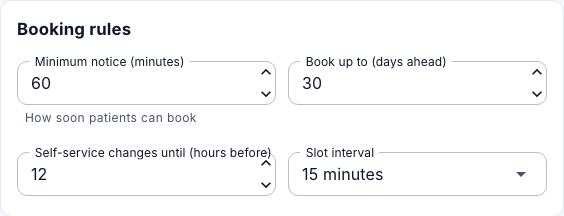
Under Booking rules, set the following:
Field Description Minimum notice (minutes) How soon customers can book. Book up to (days ahead) 1 to 365. Self-service changes until (hours before) Until when customers can reschedule or cancel themselves. Slot interval The times offered: every 5, 10, 15, 20, 30 or 60 minutes. -
Under Booking approval, set the following:
Field Description Release unanswered requests after 4 to 72 hours, or Never (until the appointment time). The customer is told, and the time is freed. Approve a new customer's first booking A first booking waits for approval, whatever the service. -
Under Reminder emails, choose the First reminder and Second reminder.
-
Select Save changes.
Services that need approval are set per service. See Set up services.
How reminders work
Reminders reduce no-shows. Customers can turn them off on their profile. Bookings made less than 2 hours before don't get a reminder, as they just received their confirmation. To send due reminders at once, select Send due reminders now.